Everyday work
Reports and transactions
Reports in CupTrack come at two levels: a short report right at the register, and detailed reports in the web panel.
The short report in the app
A short report is available right at the register — a summary of the day's sales. It's seen by the cashier working the shift: their own revenue, the number of receipts and the day's total. Handy for cashing up quickly at the end of a shift.
Detailed reports in the web panel
The full reports are in the web panel (in a browser on a computer) and are meant for analysing the business:
- Revenue for a period — by day, week, month or a custom date range.
- Sales by item — what sold and how much of it.
- Sales by category — which groups bring in more.
- Trends — how revenue moves over time.
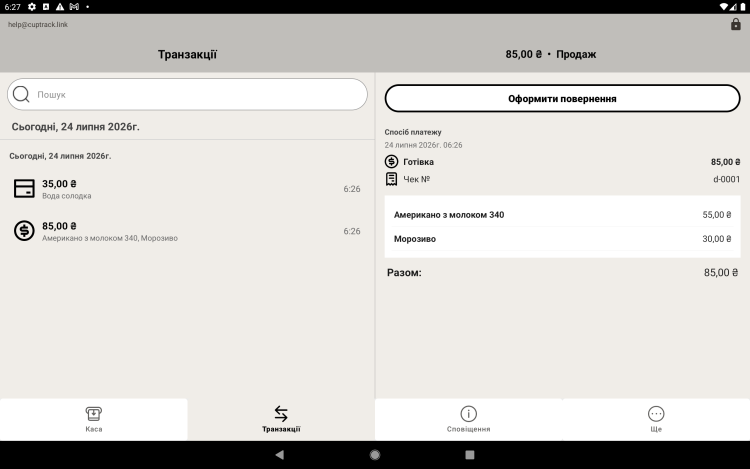
- Transactions — the full list of sales with details, payment method and cashier.
Access. The detailed reports in the web panel are available only to the account administrator (the owner). Cashiers see just the short report at the register.
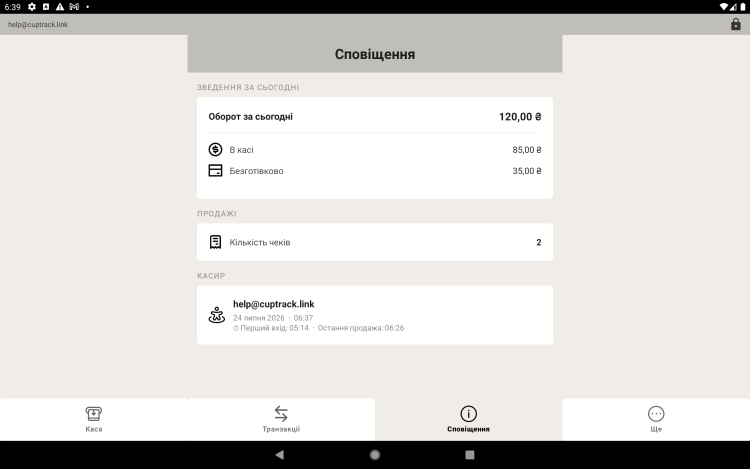
Tip. The cashier checks the short report at the end of the shift to cash up, while the owner works through the detailed reports in the web panel — revenue for the period, popular items and trends.